This article originally appeared on rand(alex).
Last week I was at the Devoxx conference, and I was following the talk about the new features of J2EE6. One of the new features is that a framework can now implement a few Service Provider Interfaces and the application server will register it automatically. No hassle with adding the configuration information to the web.xml, just add the frameworks jar to your webapp.
Well it inspired me to use the same kind of mechanism in my benchmark framework. Why should I have to specify a class name in my scripts when I could let the framework discover all the providers, by implementing the standard Service Provider mechanism.
Since most people don't come in direct contact with Service Provider interfaces, it's not a well understood concept. That's a pity, because it's an easy way to implement extensible applications.
My framework needs to run on J2SE1.5 onwards, so I can't use the ServiceLoader utility that is available in 1.6. So I decided to write me a basic service provider loader from scratch. And now it's time to dissect the loader.
But before looking at the loader, let's take a peek what it takes to create an actual Service Provider. Not much actually, you need an interface that describes the provider, java.sql.Driver is a famous example. And an actual implementation of that interface that is the actual provider. If you installed JavaDB with your JDK you can take a look at "derbyclient.jar", what is an actual service provider, in this example the derby client jdbc driver. The class that implement the Driver interface is org.apache.derby.jdbc.ClientDriver.
Now the only thing left to do in making this a real service provider is adding one little file. The filename is actually the name of the interface, and the content is the name of the class implementing that interface.
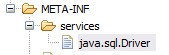
The location is also important, in META-INF/services/. In our example we have a file named java.sql.Driver with the content org.apache.derby.jdbc.ClientDriver.
Now having everything in place we can start with implementing our loader. It will be a basic loader that starts it search and load the Class for the requested provider at construction time. Let's make it Iterable, so we can use it in the cool for loops introduced since SE5.
public class SPILoader implements Iterable<Class> {
The following code does the actual heavy lifting. Let's go over it step by step. I prefer calling the constructor with the actual interface, in our example java.sql.Driver.class.
Once we have it canonical name we can start searching for every instance of the file that has the file META-INF/services/java.sql.Driver in it's classpath ( see line 19 ). It will search for it in every jar or path known to the current classloader.
The only thing left to do is enumerate over every file a create a Class of that instance ( line 33 ), and store it in our HashMap.
/**
   * Try to load all known provider classes.
   *
   * @param spiClass
   * @throws Exception
   */
  public SPILoader(Class spiClass) throws Exception {
    this(spiClass.getCanonicalName());
  }

/**
   * Try to load all known provider classes.
   *
   * @param spiClass
   * @throws Exception
   */
  public SPILoader(String spiClass) throws Exception {
    ClassLoader classLoader = getClass().getClassLoader();
    Enumeration resourceEnumeration = classLoader.getResources("META-INF/services/" + spiClass);
Next is write a methods to get our discovered providers. I needed one that returned only one, so I opted to write on that accepted a list of preferred providers if they are available. I have my favorite providers you know :-)
/**
   * Get a SPI provider class, optionally providing an ordered list of preferred providers.
   * @param prefered
   * @return
   */
  public Class get(String... preferred) {
    if (preferred != null) {
      for (String p : preferred) {
        Class clazz = _spis.get(p);
        if (clazz != null) {
          return clazz;
        }
      }
    }
    Iterator<Class> iterator = _spis.values().iterator();
    if (iterator.hasNext()) {
      return iterator.next();
    }
    return null;
  }
To top the loader of, lets implement the iterator method so we can loop over all discovered classes.
/**
   * Iterate over the known provider classes.
   */
  public Iterator<Class> iterator() {
    return _spis.values().iterator();
  }
Now it's time to use our loader, with some examples. Let's search for all JDBC drivers that are available in the current classpath.
SPILoader jdbcDrivers = new SPILoader(java.sql.Driver.class);
    for(Class<?> driverClass : jdbcDrivers) {
      System.out.println(driverClass.toString());
    }
If you added the derbyclient.jar mentioned in the beginning of this post to the classpath the code should output something like this
class sun.jdbc.odbc.JdbcOdbcDriver class org.apache.derby.jdbc.ClientDriver
And if you're only interested in one provider (example: a SAX parser, you only need one) use the get method.
SPILoader loader = new SPILoader(labs.SPIClass.class);
    Class<?> clazz = loader.get("labs.SPIImpl1","labs.SPIImpl1");
    if(clazz != null) {
      // create instance of your favorite SPI implementation
      labs.SPIClass inst = (labs.SPIClass)clazz.newInstance();
    }
If you are lucky enough to have J2SE 6 as your minimal platform you are lucky enough to have java.util.ServiceLoader available to you, I just don't understand that it took till SE 6, to have a utility class available in the JDK. Anyway I hope this walk trough gives you some inside how auto discovery works for service providers. Have fun writing your own.